

Your ISP’s DNS is probably the weakest link in your connection right now, and there’s zero reason to stick with it. But even if you know that, the bigger question is what DNS you should switch to because every option seems to market itself as the fastest and most private.
The honest answer is that no one can tell you which DNS is best for your connection. The only way to actually know is to test them yourself. That’s exactly what I did, and the best DNS server wasn’t the one I had been using for months.
Understanding DNS and Why It Matters
DNS, or Domain Name System, is often called the phonebook of the internet. When you type a website address like example.com, your device contacts a DNS server to look up the corresponding IP address. This translation happens in milliseconds, but the quality of your DNS server can significantly affect your browsing speed and even your online privacy.
By default, your devices stick to your ISP’s DNS server. The problem is that ISP-provided DNS servers are rarely optimized for speed or security. They are often slow, overloaded, and prone to logging your browsing history for monetization. This means your ISP could potentially see every website you visit, building a profile of your online activities.
That’s why switching to a third-party DNS server is almost always a better move. Providers like Google DNS, Cloudflare, Quad9, NextDNS, AdGuard DNS, and ControlD offer faster resolution times and enhanced privacy features. Some even block malicious domains and trackers at the DNS level. However, not all DNS servers perform equally on every network.
The Best DNS Isn’t the Same for Everyone
Why Performance Varies
DNS performance depends on multiple factors: your physical location, how well a provider’s network peers with your ISP, the time of day, and even the specific nodes your traffic hits. A DNS service with 50+ global nodes may route your queries to a different server based on load, which can drastically change response times.
Cloudflare might be the fastest option for someone in New York, while Google DNS could be better for someone in London. Quad9 might shine on a fiber connection, while NextDNS may work best on a mobile network. This variability means there’s no universal “best” DNS. The only reliable way to find the best one for your connection is to test it directly from your own device.
DNS Speed Test Found the Best Server for Me in Under 30 Seconds
No Need to Install Anything
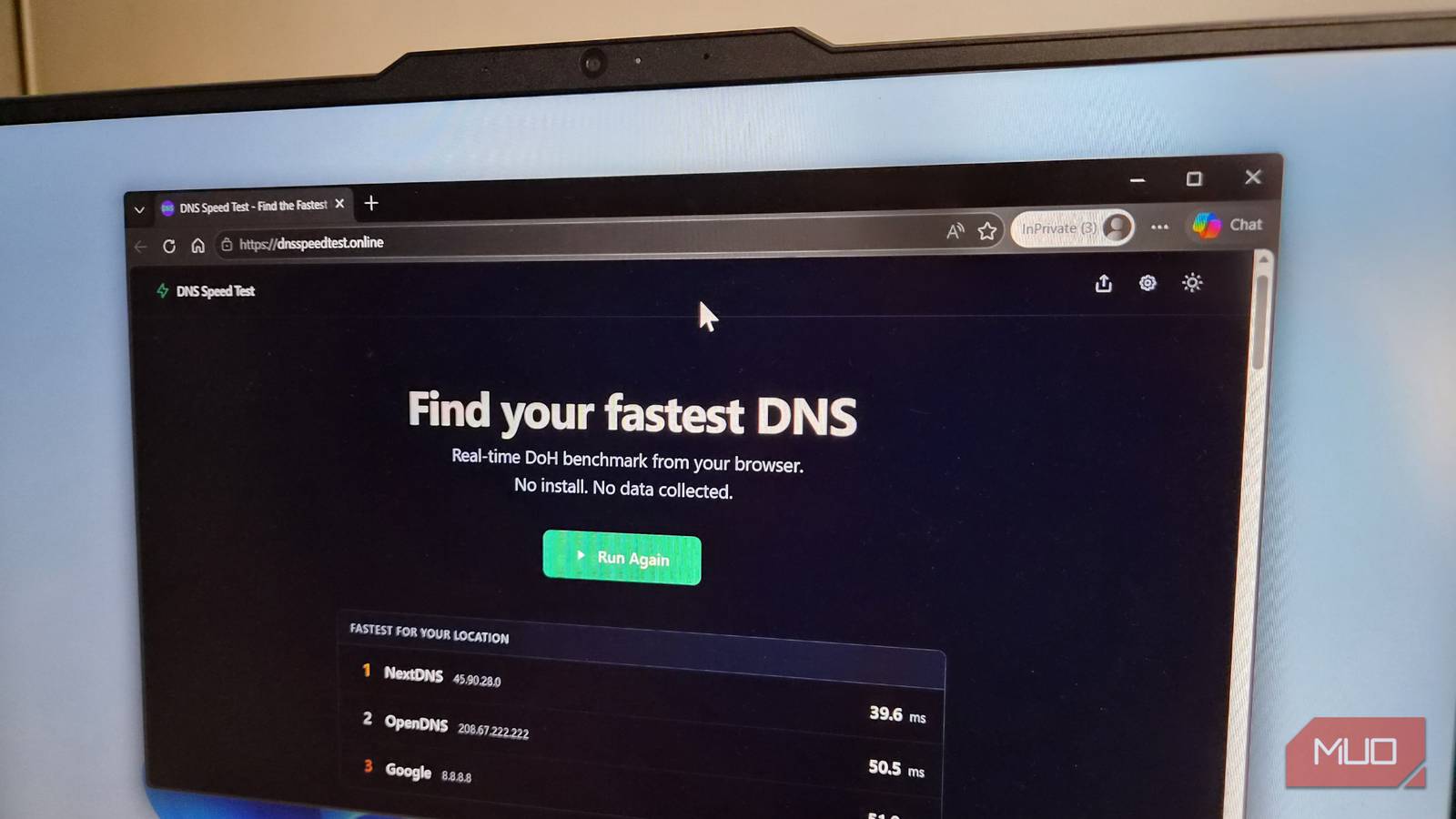
There is no shortage of DNS benchmarking tools, but most either require installation, bombard you with raw numbers, or are confusing to interpret. That’s why I rely on the DNS Speed Test, a free browser-based tool that tests popular DNS servers from your current network.
It works by sending several DNS queries to each server and measuring how long they take to respond. The tool runs a warm-up phase before testing to ensure realistic results. The entire test completes in around 30 seconds. Once done, it displays the top three fastest DNS providers for your specific setup. You can also scroll down to see a complete breakdown of minimum, maximum, median, and average speeds for each DNS provider.
But don’t stop at one test. Network conditions change throughout the day, so run the test at different times (morning, afternoon, evening) to get a consistent picture. Additionally, you can customize the list of domains queried. By default, the tool tests popular sites like Google, YouTube, ChatGPT, and Reddit — which many DNS providers actively cache. To get the most accurate results, replace those with the websites you visit daily.
Speed Isn’t the Only Thing to Look For
Security, Privacy, and Extra Features
Once you’ve identified the fastest DNS servers for your network, it’s time to consider what else they offer. Raw speed is important, but DNS servers today do much more than resolve names.
- Quad9 is known for security. It automatically blocks known malicious domains, including phishing sites and malware hosts. It also follows a strict no-logging policy.
- Cloudflare prioritizes privacy with a public pledge never to log your IP address. It’s also extremely fast due to its global anycast network.
- NextDNS offers customizable filtering, a detailed dashboard showing blocked queries, and robust security features. It has a free tier with limited queries, after which it stops working.
- AdGuard DNS blocks ads, trackers, and phishing at the DNS level. It works across all devices without installing any software.
- CleanBrowsing is ideal for families. It blocks adult content and enforces SafeSearch on Google and YouTube at the network level.
- Google DNS is widely available and reliable, but it does collect data for analytics (though not tied to your Google account).
Consider your priorities: if privacy is paramount, choose Cloudflare or Quad9. If you want ad-blocking without extensions, AdGuard or NextDNS are excellent. For family safety, CleanBrowsing is a solid option. And if budget is a concern, many of these have generous free tiers—except NextDNS, which limits monthly queries.
How to Change DNS on Your Devices
Once you’ve selected your preferred DNS provider, you can change the settings on your router to affect all connected devices, or change it individually on each device. Changing on the router is easier and covers Wi-Fi, but mobile data still uses your carrier’s DNS unless you configure it separately.
On Windows, you can change DNS in the network adapter properties. On macOS, go to System Settings > Network. On Android (version 9+), you can set a private DNS (DNS-over-TLS) in the connection settings. On iOS, you can install a DNS profile or use apps like NextDNS. For routers, the process varies by model, but typically you log into the admin interface and look for DNS settings under WAN or Internet.
Additional Tips for Optimal DNS Performance
To get the most out of your new DNS, consider using DNS-over-HTTPS (DoH) or DNS-over-TLS (DoT) if your provider supports them. These protocols encrypt your DNS queries, preventing eavesdropping and tampering. Many modern browsers and operating systems support DoH/DoT natively.
Also, periodically retest the DNS servers. ISPs sometimes change network routes, and new DNS providers emerge. Running the DNS Speed Test every few months ensures you’re still using the best option.
Finally, remember that DNS is just one piece of the puzzle. For comprehensive privacy and security, combine a good DNS with a VPN (for masking your IP) and a secure browser. And always keep your devices updated.
By taking a few minutes to test and optimize your DNS, you can improve your browsing speed, block unwanted content, and protect your online activity from prying eyes.
Source: MakeUseOf News